
The Section Report aggregates student response data for one section of a course in a specific academic period. It opens with a summary of every prompt, then gives full detail — including student comments — for each one.
Learn how to access a Section Report →
1. Summary
The opening page identifies the course, section, instructor, and term, then summarizes every survey prompt in one table.
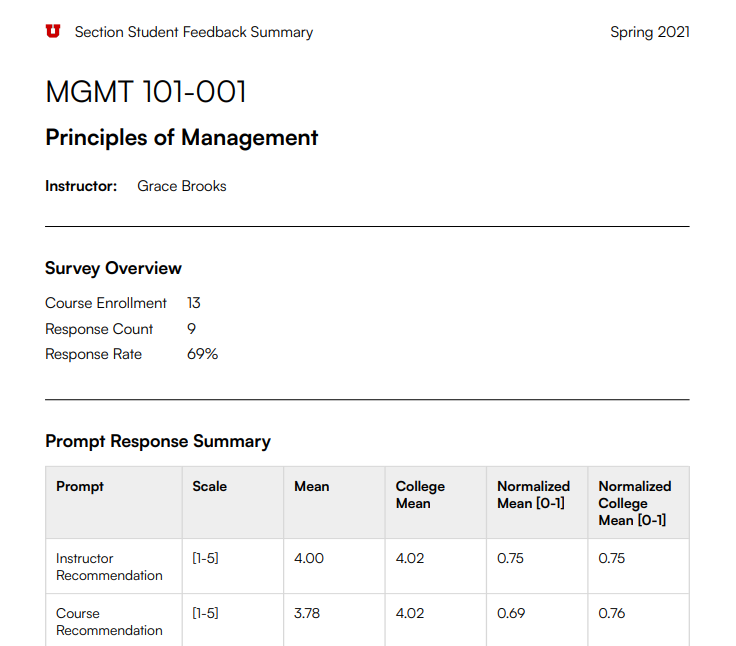
- Survey Overview — course enrollment, response count, and response rate for this section.
- Prompt Response Summary — every rated prompt, its scale, this section's mean, and the college mean for comparison, each as a raw score and normalized (0–1) score.
2. Response detail
Each prompt then gets its own page: the question, a breakdown of how many students chose each response option, and every comment students submitted for that prompt.

- The breadcrumb (Response Details → prompt name) shows which prompt the page covers.
- The bar chart shows the count and percentage of students who chose each response option, from "Strongly Agree" down to "Strongly Disagree".
- Student Comments are reproduced verbatim, unedited — including spelling and grammar as submitted.
Reading the scores
Mean is the average of raw student ratings on the prompt's own scale (e.g., 1-5). Normalized [0-1] rescales that same average to 0-1, which makes scores comparable across prompts and
against the college mean.
Learn more about the Normalized Mean →