
The Instructor Report aggregates student response data for each section a given instructor has taught in the last five years, for prompts about instructor and course recommendation. It has three views: a five-year trend, a section-by-term summary, and full response detail for each prompt.
This report is not comprehensive. It covers only the "Course Recommendation" and "Instructor Recommendation" prompts, summarized over time. Every other prompt in the survey — course content, workload, and the rest — appears only in the Section Report for each individual section.
Learn how to access an Instructor Report →
1. Five-year trend
The opening pages identify the instructor and their appointment(s), then repeat the same chart-plus-table pattern twice — once for each of the two prompts this report covers:
- A Course Recommendation trend chart, followed by its data table.
- An Instructor Recommendation trend chart, followed by its data table.
The example below shows the Course Recommendation chart. The same page layout — instructor name and appointments, then the chart — repeats for Instructor Recommendation later in the report.
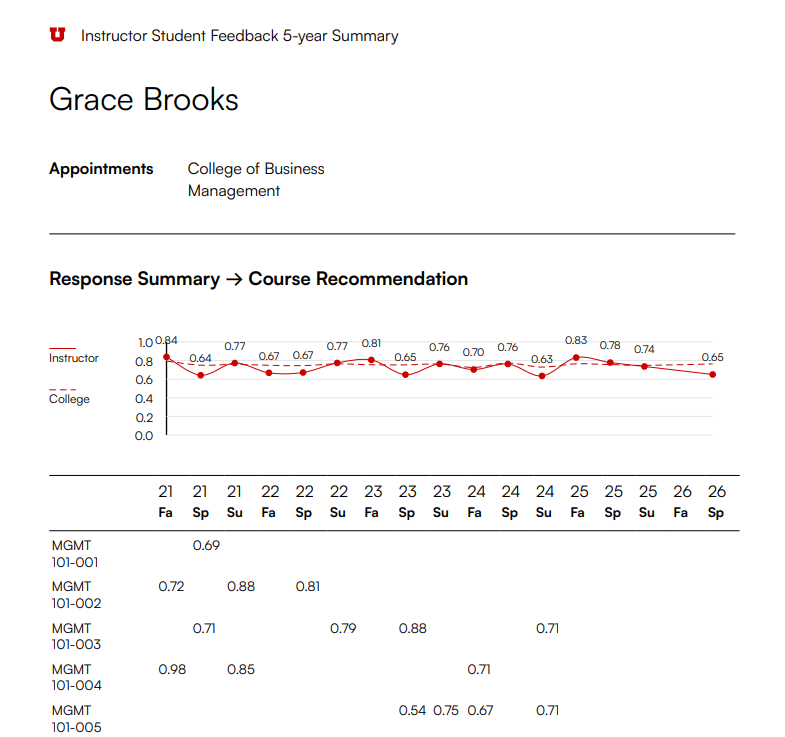
- Appointments — the college/department(s) the instructor is appointed to.
- Instructor (solid line) is the instructor's normalized score for that prompt each term; Department/College (dashed line) is the department/college average for comparison.
- Each column below the chart is one term (e.g. "21 Fa" = Fall 2021); each row is a section that instructor taught, with that section's score in the terms it ran.
2. Section summary by term
Each term the instructor taught gets its own table listing every section, with enrollment, response counts, and both course and instructor scores side by side.
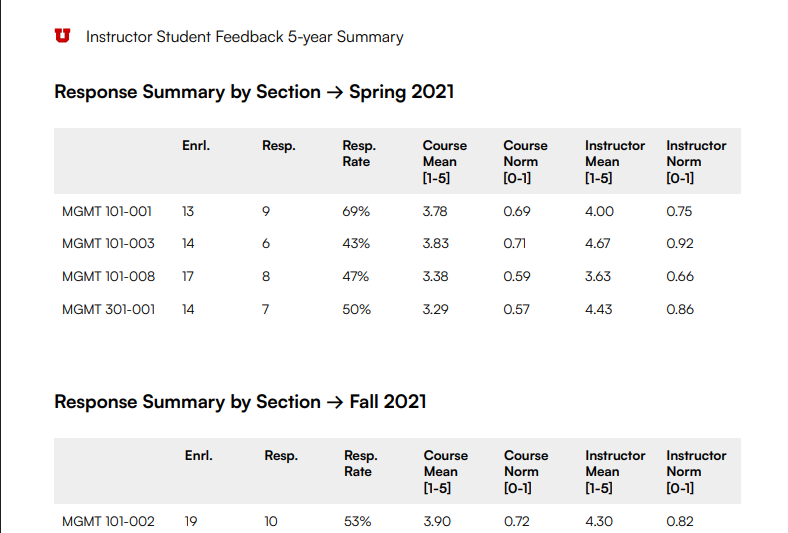
- Enrl. / Resp. / Resp. Rate — enrollment, number of responses, and the response rate for that section.
- Course Mean / Course Norm — the section's overall course-rating score, as a raw mean (1–5) and normalized (0–1).
- Instructor Mean / Instructor Norm — the same section's instructor-rating score, in both scales.
3. Response detail
Below the summaries, the report breaks out full detail for each section, term, and prompt: the survey question, that section's score against the college's, and every student comment submitted for that prompt.

- The breadcrumb (Response Details → term → section) shows which section's data you're looking at, and how many sections that instructor taught that term.
- The score table compares that section's Mean/Normalized against the college's, for that prompt.
- Student Comments are reproduced verbatim, unedited — including spelling and grammar as submitted.
Reading the scores
Mean [e.g., 1-5] is the average of raw student ratings on the survey's scale. Normalized [0-1] rescales that same average to 0-1, which is what makes scores comparable across time and against the college average.